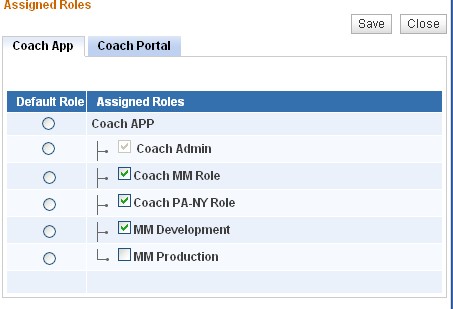
iframe assignRole
frame嵌套操作:点击按钮--》弹出对话框(嵌套iframe)--》取得iframe值,并保存在parent对象中,点击ok--》在原页面取得选中的值(回填)
test.jsp(button-->click)-->test1.jsp(iframe -->popup.jsp)
test.jsp
[html] view plaincopy
- <%@ page language="java" contentType="text/html; charset=utf-8"
- pageEncoding="ISO-8859-1"%>
- <!DOCTYPE html PUBLIC "-//W3C//DTD HTML 4.01 Transitional//EN" "http://www.w3.org/TR/html4/loose.dtd">
- <html>
- <head>
- <meta http-equiv="Content-Type" content="text/html; charset=ISO-8859-1">
- <title>Insert title here</title>
- <script type="text/javascript" src="js/jquery-1.7.1.js"></script>
- <script type="text/javascript" src="js/test.js"></script>
- </head>
- <body>
- username:<input name="username" type="text"> <input type="button" name="popup" onclick="javascript:getNames()">
- <form method="post" action="/suite/EditUserAction.do" name="frmEditUser">
- <table>
- <tr >
- <td width="20%" >* Assigned Roles</td>
- <td width="80%" colspan="3" >
- <input type="hidden" value="" name="defaultRoleID">
- <input type="text" style="display:none;" value="" name="forCheckChangeDefRole">
- <input type="hidden" value="" name="roleIds">
- <table width="100%">
- <tbody>
- <tr>
- <td nowrap="" class="attributeContent" id="showRoleNames"></td>
- <td width="100%" id="roleNamesButton">
- <input type="button" onclick="javascript:getNames();" value="..." >
- </td>
- </tr>
- </tbody></table>
- </td>
- </tr>
- </table>
- </form>
- </body>
- </html>
test1.jsp
[html] view plaincopy
- <%@ page language="java" contentType="text/html; charset=utf-8"
- pageEncoding="utf-8"%>
- <!DOCTYPE html PUBLIC "-//W3C//DTD HTML 4.01 Transitional//EN" "http://www.w3.org/TR/html4/loose.dtd">
- <html>
- <head>
- <meta http-equiv="Content-Type" content="text/html; charset=utf-8">
- <title>Insert title here</title>
- <script type="text/javascript" src="js/jquery-1.7.1.js"></script>
- <script type="text/javascript" src="js/test.js"></script>
- </head>
- <body>
- 用户名<input name="username" type="text"> <input type="button" name="popup">
- <iframe width="100%" scrolling="auto" height="1000" frameborder="0" name="assignRoleFrame" src="popup.jsp"></iframe>
- </body>
- </html>
popup.jsp
[html] view plaincopy
- <%@ page language="java" contentType="text/html; charset=utf-8"
- pageEncoding="utf-8"%>
- <!DOCTYPE html PUBLIC "-//W3C//DTD HTML 4.01 Transitional//EN" "http://www.w3.org/TR/html4/loose.dtd">
- <html>
- <head>
- <meta http-equiv="Content-Type" content="text/html; charset=ISO-8859-1">
- <title>Insert title here</title>
- </head>
- <script language="javascript" src="js/open.js"> </script>
- <body>
- assignRoles:
- <input type="text" name="username">
- <form action="" name="main" method="post">
- <input type="hidden" value="1000" name="companyID">
- <table width="100%" cellspacing="1" cellpadding="0" border="0">
- <tbody><tr>
- <td width="100%" nowrap="" align="left" colspan="2" class="titleHeader">Assign Roles</td>
- </tr>
- <tr>
- <td width="50%" align="left" class="bodyBold"></td>
- <td width="50%" align="right">
- <input type="button" onclick="onClickOK();" value="OK" name="" class="button">
- <input type="button" onclick="javascript:top.close()" value="Close" name="" class="button">
- </td>
- </tr>
- <tr>
- <td height="2" colspan="2"></td>
- </tr>
- </tbody></table>
- <table width="100%" cellspacing="0" cellpadding="0" border="0">
- <tbody>
- <tr class="listViewThS1">
- <th width="24%" align="center">Default Role</th>
- <th width="76%">Assigned Roles</th>
- </tr>
- <tr>
- <td align="center"><input type="radio" checked="" id="radio0" value="1000" onclick="selectRadioBox('0');" name="defaultRole" style="width:15;height:15"></td>
- <td nowrap="" class="bodyBold">
- <img align="textTop" src="/suite/img/roles_t_spacer.gif">
- <input type="checkBox" disabled="" checked="" id="check0" value="1000" name="selectRoles" style="width:15;height:15">
- Company Administrator
- </td>
- <input type="hidden" id="roleName0" value="Company Administrator" name="roleName">
- </tr>
- <tr>
- <td align="center"><input type="radio" id="radio1" value="1010" name="defaultRole" onclick="selectRadioBox('1');" style="width:15;height:15"></td><
- td nowrap="" class="bodyBold">
- <img align="textTop" src="/suite/img/roles_t_spacer.gif">
- <input type="checkBox" id="check1" value="1010" name="selectRoles" style="width:15;height:15">
- <input type="hidden" id="roleName1" value="dev" name="roleName">
- </td></tr>
- <tr><td align="center"><input type="radio" id="radio2" value="1011" name="defaultRole" onclick="selectRadioBox('2');" style="width:15;height:15"></td><td nowrap="" class="bodyBold">
- <img align="textTop" src="/suite/img/roles_l_spacer.gif">
- <input type="checkBox" id="check2" value="1011" name="selectRoles" style="width:15;height:15">
- qa
- <input type="hidden" id="roleName2" value="qa" name="roleName">
- </td></tr>
- </tbody></table>
- </form>
- </body>
- </html>
test.js
[javascript] view plaincopy
- function getNames(){
- var properties = 'toolbar:no;menubar:no;scrollbars:no;resizable:no;dialogHeight:550px;dialogWidth:480px';
- var url = "/test/test1.jsp";
- var DialogArgument = new Object();
- DialogArgument["src"] = url;
- DialogArgument["title"] = "Assigned Roles";
- var oValue = showModalDialog(url, DialogArgument, properties);
- if(oValue!=null){
- $("input[name=defaultRoleID]").val(oValue.defaultRole);
- $("input[name=roleIds]").val(oValue.roleIds);
- $("input[name=username]").val(oValue.roleNames);
- var button=document.getElementById("roleNamesButton").innerHTML;
- document.getElementById("roleNamesButton").innerHTML=oValue.roleNames+button;
- }
- return true;
- }
- function SaveObjParent(returnValue,obj){
- window.parent.returnValue=obj;
- }
open.js
[javascript] view plaincopy
- function selectRadioBox(id){
- document.getElementById("check"+id).checked=true;
- document.getElementById("check"+id).disabled=true;
- var checkbox=document.getElementsByName("selectRoles");
- for(var i=0;i<checkbox.length;i++){
- if(i!=id)
- checkbox[i].disabled=false;
- }
- }
- function onClickOK(){
- var returnRoles=new Object();
- var returnValue;
- var onSelectedRadio=document.getElementsByName("defaultRole");
- var selectRoleId=document.getElementsByName("selectRoles");
- var selectRoleName=document.getElementsByName("roleName");
- var roleIds="";
- var roleNames="";
- var defaultRoleID="";
- var j=0;
- for(var i=0;i<onSelectedRadio.length;i++){
- if(onSelectedRadio[i].checked){
- defaultRoleID=onSelectedRadio[i].value;
- roleIds=selectRoleId[i].value+roleIds;
- roleNames=selectRoleName[i].value+"(<font color='red'>Default</font>)"+roleNames;
- }
- else if(selectRoleId[i].checked){
- roleIds=roleIds+","+selectRoleId[i].value;
- roleNames=roleNames+","+selectRoleName[i].value;
- }
- }
- if(defaultRoleID==""){
- alert("Please select default role.");
- return;
- }
- returnRoles.defaultRole=defaultRoleID;
- returnRoles.roleIds=roleIds;
- returnRoles.roleNames=roleNames;
- var obj=returnRoles;
- window.parent.SaveObjParent(returnValue,obj);
- window.parent.close();
- }